Are you looking for outfits ideas for the Dress To Impress Birthstones Theme? This is one of my favorite themes, as you can choose any one of the twelve birthstones from; garnet, amethyst, aquamarine, diamond or quartz, emerald, pearl or alexandrite, ruby, peridot, sapphire, opal or tourmaline, topaz, and turquoise.
Keep on reading for some outfit ideas you could use for this theme, and you can just swap the colors to match the birthstone you want to do.
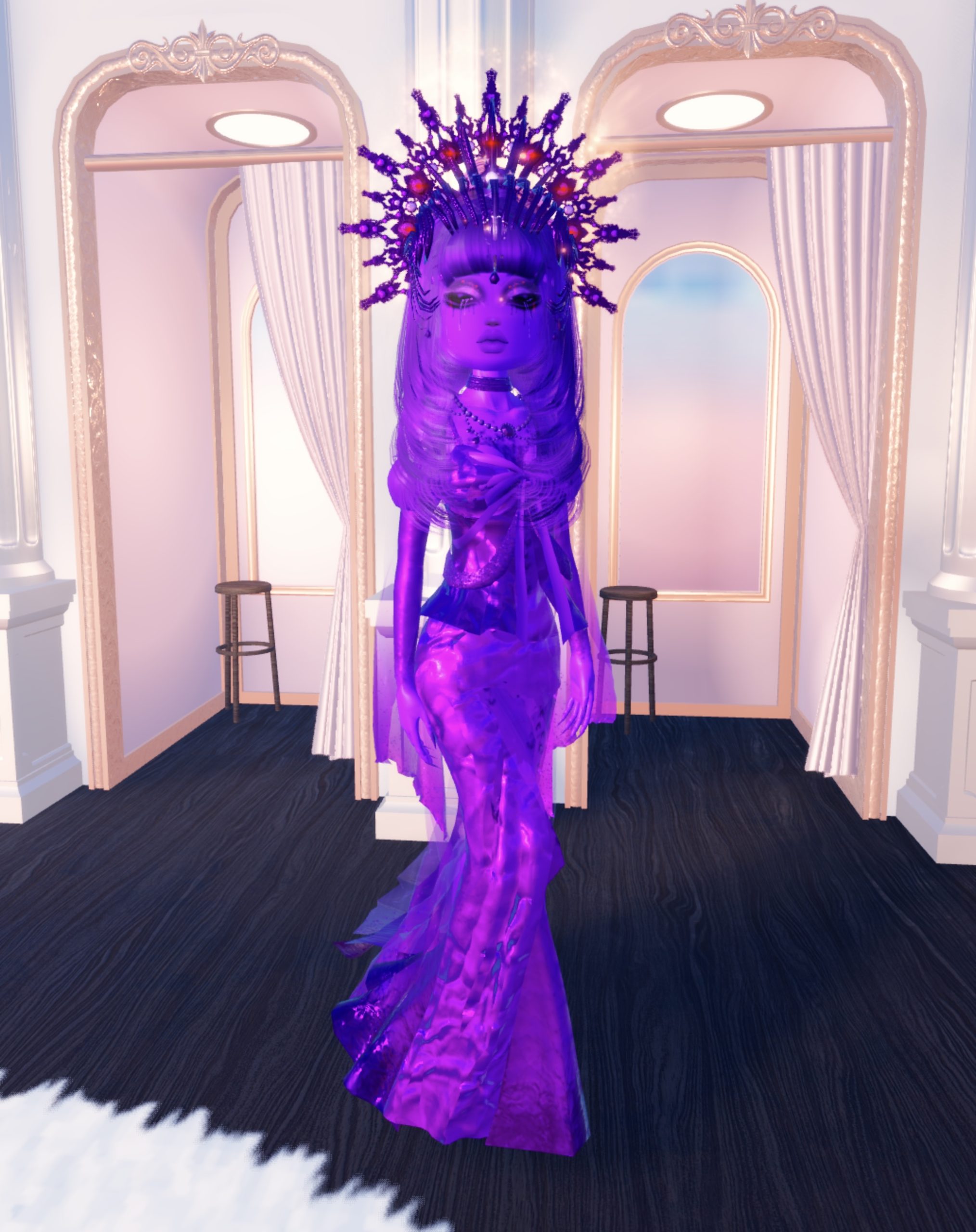
For my first birthstones outfit, I did an Amethyst themed outfit for February, as purple is my favorite color.
Starting off, I chose the Ice Queen Heels from the Winter Quest in the color #8418cd, and on the head I layered two crowns; the Style Showdown crown in the color #440c69 for both sections, and then the Runway Diva crown in the color #440c69 for the first section, a41eff for the second section and d18cff for the third section.
For the dress, I layered a couple of dresses, starting with the Ice Queen Dress on toggle “1” and in the color 8418cd for the first section, 440c69 for the second section and 8418cd for the third section.
Underneath that dress, I chose the Halloween Quest Dress on toggle “type 4” and in the color 8417cc all over and on the “foil” fabric, and the Ice Queen Sleeves 8418cd for all three sections.
I then used the Valentine’s Dress from the non-VIP section (with the detachable bow on the top), and I used the bow only toggle in the color 8418cd.
The last section of the top, I used the Cupids Prodigy Valentine’s Quest top, and used the “layer” only toggle, removing the jewels and removing the veil, and making it 5c118f all over, and silk.
I used the sleeves from the Lace-Up Valentine’s Corset in VIP in 8418cd for the first section and d18cff for the second section, and both silk. Finishing with the layered necklace in non-VIP in 480c6f, 5c297e and e7e7ec, and finally the thick choker in silk and 580f89.

I did a garnet inspired outfit for my next birthstones outfit.
I started the outfit off with the thigh-high boots from non-VIP, and choose the knee-high toggle, and made them glitter and the color 680c0e.
I added the fishnet tights on toggle one, and the color 680c0e for a subtle red fishnet effect.
For the hair, I added the LANABOW code item, and made it glitter and 680c0e for the back of the head.
For the top, I chose the top from the Moongazer Dress (Robux) and made it glitter and the colors 680c0e, 380607 and 680c0e.
Over the top of that top, I added the iBella top/jacket combo with the “jacket only” toggle, with the watermelon patch turned off, and made glitter and the color 680c0e.
I chose the Choopieisback skirt for the skirt, and made it glitter all over and the colors 680c0e, 680c0e, 680c0e and 4b080a.
For my jewelry, I chose the free body chain in 4b080a, the pendant choker necklace in 4b080a, and the flower earrings in VIP in 4b080a

My next birthstone inspired outfit is for the birthstone “pearl” and I created a white, 60’s inspired outfit.
For my boots, I used the LABOOTS code item for the chunky retro boots in white all over #ffffff.
I used the fur long sleeves from non-VIP on toggle “1” and made white all over #ffffff.
Then I put on the heart cut-out dress, and made it matte and white #ffffff. Layered over the dress, I put on the butterfly top on toggle “default” and made matte and white #ffffff.
Next, I put on the VIP rainbow skirt on toggle “4” made matte all over and white #ffffff. Then, I used the Ice Queen Sleeves on toggle “2” and made white #ffffff.
Also, I added the currency Supernova Corset with toggle “3” and made matte all over and again, white #ffffff.
I used the layered necklace from non-VIP on toggle “2” and made matte and white all over #ffffff. Layered with the thick choker from non-VIP and made white and matte.
Lastly, I used the chunky hoops from non-VIP and made them matte and white #ffffff.

For my final birthstone inspired outfit, I chose ruby, and went for all red glitter all over, with a nice contrast against jet black hair.
Starting off, I used the gray skin tight strapless top from non-VIP to give a smooth base for the top, and I chose toggle “tight” and made it glitter and the color #680c0e.
On top of that top I put on a butterfly top on the “default” toggle and made glitter and the color #680c0e.
I layered on top of that the Lana crop top with the long frilly sleeves on the “smooth” toggle to remove the stripes, turned glitter and the color #680c0e.
I chose the puffy pink sleeves from the mannequin in non-VIP with the pink and white corset, and made the sleeves glitter and #680c0e.
For the skirt, I layered two skirts. First, I chose the white fitted mini-dress with the jewels on the bust area and chose toggle “skirt only” for a smooth fitted mini-skirt, and made it glitter and #680c0e.
On top of that skirt, I added the ELLA code skirt on “short” toggle and made that also glitter and the color #680c0e.
For the accessories, I chose the bow heels from non-VIP and made the colors #680c0e, #440809 and #680c0e. I used the long dangly crystal earrings in the color #680c0e, and the thick choker from non-VIP made #680c0e and glitter. Lastly, I used the code eyelashes on toggle “toggle 1” and made black.